
Custom EdTech Software: A Complete Guide to Smarter Learning Platforms
June 17, 2026
Software Dowsstrike2045 Python Update: Complete Guide, Features, Installation, and Troubleshooting
June 18, 2026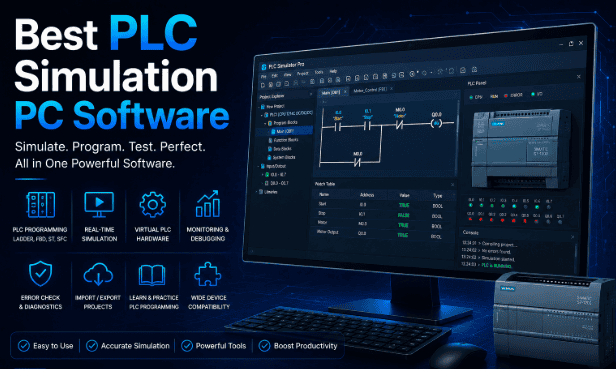
Programmable Logic Controllers sit at the core of nearly every modern factory, and learning to program them safely starts long before any cable gets connected to real machinery. Searching for the best PLC simulation PC software has become the natural first step for students, hobbyists, and working engineers who want to practice control logic without risking expensive equipment or production downtime.
This guide walks through what PLC simulators actually do, why they matter, and which programs currently stand out among professionals and educators. By the end, you should have a clear sense of which tool fits your budget, your skill level, and the specific PLC brand you plan to work with.
What is PLC Simulation Software?
PLC simulation software is a computer program that mimics the behavior of a real Programmable Logic Controller without requiring any physical hardware to be connected. It lets engineers and students write, test, and debug control logic directly on a standard PC, watching how inputs and outputs would react inside a live industrial setup.
Because the simulator behaves like the actual controller, logic mistakes can be caught early, long before any wiring or machinery becomes involved. This is exactly why the best PLC simulation PC software has become so valuable in classrooms and training centers, where dozens of students need hands-on practice despite a facility owning only a handful of physical PLC units.
Why Use PLC Simulation Software? (Key Benefits)
Investing time in a good simulator pays off in several practical ways that go well beyond saving money on hardware. The points below outline the benefits that make simulation tools worth adopting for individuals and training organizations alike.
- Cost savings on hardware – Real PLCs, sensors, and actuators can be expensive, and building a full test rig for every single project rarely makes financial sense. A simulator removes this cost entirely by replacing physical components with virtual equivalents that behave the same way logically.
- Safer testing and debugging – Running untested logic directly on factory equipment can damage machinery or put workers at risk during testing. Simulation lets you catch errors, unsafe sequences, or infinite loops in a completely risk-free digital space first.
- Faster development cycles – Without needing to wire hardware or wait for physical responses, programs can be written, tested, and revised much more quickly inside a simulator. This speed becomes especially useful when iterating through several versions of the same control sequence.
- Better training and remote learning – Students and new hires can practice PLC programming from almost any computer, which works well for remote or hybrid learning setups. This accessibility is a major reason the best PLC simulation PC software keeps gaining popularity in technical colleges.
- Realistic fault simulation – Many simulators let you intentionally introduce faults, such as a stuck sensor or a failed actuator, to observe how your logic responds. Replicating this kind of failure safely with real machinery would be both difficult and costly.
How PLC Simulation Software Works
Most simulation tools fall into one of two categories: a true emulator that runs the same firmware as the physical controller, or a soft PLC that interprets the same programming standard on regular computer hardware. Emulators such as Siemens PLCSIM or Rockwell’s Logix Emulate are built directly by the manufacturer, so logic execution matches the real device almost exactly.
Soft PLCs, by contrast, typically follow open standards such as IEC 61131-3 and can often run logic written for several different controller brands. Communication between the simulator and other software, including an HMI or a 3D visualization tool, usually happens through industrial protocols like OPC UA, Modbus, and EtherNet/IP, letting a simulated PLC behave exactly as it would on a real production line.
Key Features to Look for in the Best PLC Simulation PC Software
Not every simulator suits every use case, so it helps to know which features actually matter before downloading or purchasing one. The list below highlights the criteria worth checking against your own goals, whether you are a student, hobbyist, or working professional.
- Brand compatibility – Check whether the software supports the PLC brand you plan to use on the job, such as Siemens, Rockwell, Mitsubishi, or Schneider Electric. Logic written for one brand’s simulator rarely transfers cleanly to another without some level of conversion work.
- IEC 61131-3 language support – Look for support of standard programming languages like Ladder Diagram, Function Block Diagram, and Structured Text. Broader language coverage means you can practice the same coding style used across most modern industrial systems.
- Built-in 3D visualization – Some simulators pair the logic engine with a 3D virtual factory floor so you can watch conveyors, sensors, and robotic arms respond to your code in real time. This kind of visual feedback makes debugging far more intuitive than reading raw input and output states.
- Real-time versus offline operation – Decide whether you need a simulator that runs logic in real time at actual scan-cycle speeds, or whether offline testing is sufficient for your purpose. Real-time accuracy matters more for professional validation work than for basic classroom learning.
- Pricing and licensing model – Some tools are completely free and open-source, while industry-grade platforms often require a paid license tied to specific hardware. Weigh your budget carefully against how advanced your simulation needs genuinely are.
- Learning resources and community support – A simulator backed by strong documentation, tutorials, and an active user community saves enormous amounts of time during troubleshooting. Beginners in particular benefit from software with abundant educational material available online.
Top PLC Simulation Software Worth Considering
Several programs consistently appear in recommendations from automation professionals and educators, each suited to slightly different needs. The table below summarizes the most widely used options before the detailed notes that follow.
| Software | Best For | PLC Brand Support | Pricing |
| Siemens TIA Portal / PLCSIM | Professional Siemens development | Siemens S7-1200 / S7-1500 | Paid license |
| Studio 5000 Logix Emulate | Allen-Bradley industrial use | Rockwell ControlLogix / CompactLogix | Paid license |
| CODESYS | Multi-brand learning and development | Vendor-neutral, IEC 61131-3 | Free with paid add-ons |
| Factory I/O | Visual 3D process simulation | Multiple brands via protocols | Paid, free trial |
| OpenPLC | Free, open-source learning | Generic, IEC 61131-3 | Free |
| LogixPro 500 | Classroom and exam-style training | Allen-Bradley style ladder logic | Low-cost paid |
Siemens TIA Portal, paired with PLCSIM or the more advanced PLCSIM Advanced, remains the industry standard for Siemens controllers, allowing full virtual networking and integration with OPC UA servers. Studio 5000 Logix Emulate offers a similarly close-to-hardware experience for Rockwell users, making it a favorite in plants that rely heavily on Allen-Bradley equipment.
CODESYS stands out for its vendor-neutral approach, letting users practice the same IEC 61131-3 languages across different controller brands without committing to one ecosystem early on. Factory I/O takes a different approach entirely, focusing on visual realism by connecting to real or simulated PLCs while displaying a fully animated 3D factory floor.
OpenPLC remains a strong choice for anyone seeking the best PLC simulation PC software without spending any money, since it is completely free and open-source while still supporting standard programming languages. LogixPro 500 continues to be used in many technical schools for its straightforward, exam-style ladder logic exercises that mirror Allen-Bradley conventions.
Free vs Paid PLC Simulators: Which Should You Choose?
Free and paid PLC simulators both serve important but different roles in learning and professional automation work. Choosing between them mainly depends on your experience level, learning goals, and whether you are preparing for academic study or real industrial applications.
Free Simulation Tools
Free tools such as OpenPLC and the base edition of CODESYS make excellent starting points for students who want to understand programming logic without any financial commitment. They cover the fundamentals of IEC 61131-3 programming reasonably well, which is usually enough for early coursework and self-study.
Paid Simulation Tools
Paid platforms such as TIA Portal with PLCSIM Advanced or Studio 5000 Logix Emulate become worthwhile once you are working professionally with a specific brand of hardware, since they replicate manufacturer behavior with far greater accuracy. Professionals preparing certifications or handling commercial automation projects generally find the investment justified.
How to Choose the Right PLC Simulator for Your Needs
Selecting the right tool starts with identifying which PLC brand you are most likely to encounter in your studies or career, since logic and simulation behavior rarely transfer cleanly between manufacturers. If your coursework or job already centers on Siemens or Rockwell equipment, learning that brand’s official simulator directly usually makes more sense than starting with a generic alternative.
Budget plays an equally important role, particularly for students who may not yet have institutional licensing available to them. Starting with a free option such as OpenPLC or the community edition of CODESYS provides a solid foundation, and you can transition to paid, brand-specific software once your career direction becomes clearer.
Frequently Asked Questions
Is PLC simulation software free to use?
Several reliable options, including OpenPLC and the base version of CODESYS, are completely free, though more advanced manufacturer-specific tools usually require a paid license tied to hardware ownership.
Can I learn PLC programming without owning real hardware?
Yes, the best PLC simulation PC software allows you to learn ladder logic, structured text, and function block programming entirely on a regular computer, with no physical controller required at all.
Which simulator works best for complete beginners?
Tools like LogixPro 500 and CODESYS tend to suit beginners well because of their simpler interfaces and abundant tutorial material, which makes the initial learning curve noticeably smoother.
Does PLC simulation software work with every controller brand?
Not always; manufacturer-specific simulators like PLCSIM or Logix Emulate only match their own brand’s hardware, while vendor-neutral tools like CODESYS or OpenPLC offer broader, though sometimes less precise, compatibility.
Conclusion
Choosing the best PLC simulation PC software ultimately depends on your specific brand requirements, budget, and learning goals, though the options covered in this guide represent the most trusted choices across both educational and professional settings. Beginners and budget-conscious learners will likely find OpenPLC or CODESYS sufficient for building a strong foundation.
Professionals working with specific industrial hardware should lean toward manufacturer tools like TIA Portal PLCSIM Advanced or Studio 5000 Logix Emulate for the most accurate results. Whichever software you pick, the goal remains the same: building confidence with PLC programming logic in a safe, cost-effective environment before that code ever touches live equipment.
Related Articles
Bus Management Software: Features, Benefits, Types, Working Process, and Complete Guide
How to Actually Create Software: Step-by-Step Beginner to Advanced Guide
Betechit.com Software Explained: Full Detailed Guide, Features, Uses, Benefits and Reality
Custom EdTech Software: A Complete Guide to Smarter Learning Platforms


