
Knowledge Base Software: The Complete Guide
July 14, 2026
GoPerfect AI Recruitment Software: The Complete Guide for Modern Hiring Teams
July 14, 2026
Engineering software has become the backbone of modern design, construction, and manufacturing processes across almost every technical field. From drafting a small mechanical part to designing an entire skyscraper, engineering software allows professionals to plan, test, and refine their ideas before any physical work begins.
It reduces human error, saves time, and helps teams collaborate more efficiently on complex projects. This guide explains everything about engineering software in a simple and organized way, so that students, professionals, and beginners can understand its role clearly. By the end of this article, you will know the major categories of engineering software, their real-world uses, and where this technology is heading in the future.
Introduction to Engineering Software
Engineering software refers to specialized computer programs that help engineers design, analyze, and manage technical projects with greater accuracy. It has transformed the way industries approach problem-solving, replacing manual calculations and paper drawings with digital precision. Below, we look at its meaning, importance, history, and impact on traditional engineering methods.
What is Engineering Software?
Engineering software is a broad term used for digital tools that assist engineers in designing products, simulating real-world conditions, and managing technical workflows. These programs can handle everything from simple 2D sketches to complex 3D simulations involving physics and material behavior. Almost every engineering discipline today depends on some form of specialized software to complete daily tasks efficiently.
Why Engineering Software is Important
Without engineering software, most modern projects would take significantly longer to design and would carry a higher risk of costly mistakes. This software allows engineers to test ideas virtually, identify flaws early, and make adjustments before spending money on physical prototypes. It also makes it easier for large teams working in different locations to share files and collaborate on the same project in real time.
History and Evolution of Engineering Software
The earliest form of engineering design relied entirely on hand-drawn blueprints and manual mathematical calculations, which were time-consuming and prone to errors. As computers became more powerful during the late twentieth century, the first CAD programs emerged, allowing engineers to create digital drawings instead of paper ones. Over the following decades, software evolved to include simulation, automation, and cloud-based features that are common today.
How Engineering Software Changed Traditional Engineering Practices
Traditional engineering practices depended heavily on physical prototypes and repeated trial-and-error testing, which consumed both time and resources. With the introduction of engineering software, professionals can now simulate stress, movement, heat, and other real-world factors directly on a computer screen. This shift has made engineering projects faster, safer, and considerably more cost-effective across nearly every industry.
Categories of Engineering Software
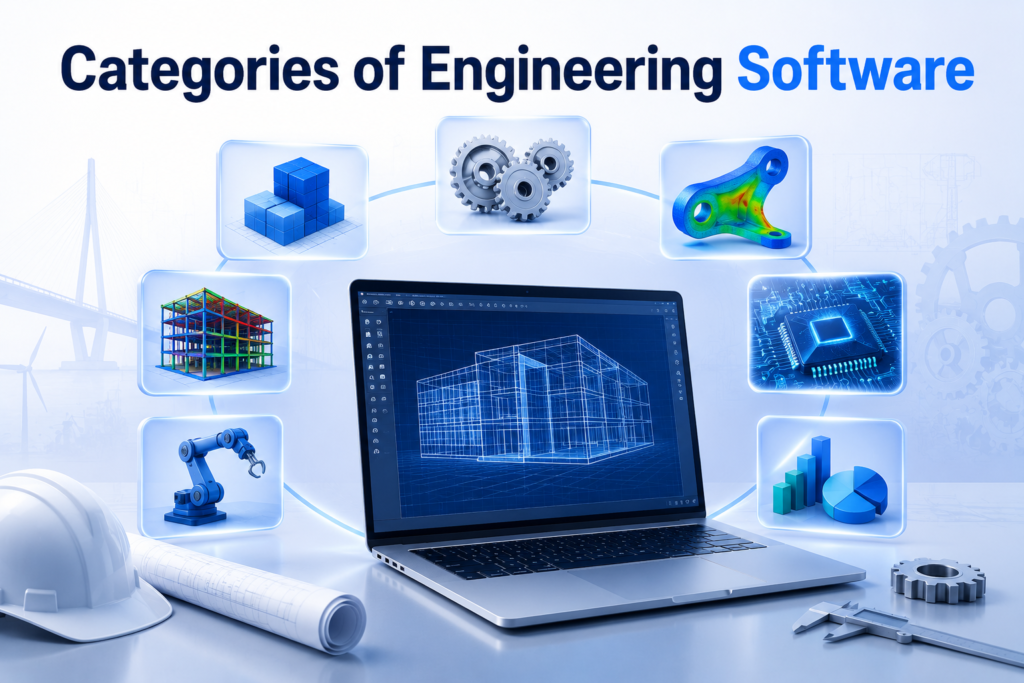
Engineering software is not a single tool but a collection of different program types, each built for a specific purpose. Understanding these categories helps in choosing the right tool for a particular engineering task.
Computer-Aided Design (CAD)
CAD software is primarily used to create detailed 2D drawings and 3D models of parts, products, or structures. It gives engineers a visual representation of their ideas before manufacturing begins, helping to catch design flaws early. CAD remains one of the most widely used forms of engineering software across mechanical, civil, and architectural fields.
Computer-Aided Engineering (CAE)
CAE software focuses on analyzing how a design will behave under real-world conditions such as stress, vibration, or heat. Engineers use these tools to predict performance and safety without needing to build a physical model first. This type of engineering software plays a major role in reducing product failures after production.
Computer-Aided Manufacturing (CAM)
CAM software takes a finished digital design and converts it into instructions that manufacturing machines can understand and execute. It bridges the gap between the design phase and actual production, ensuring accuracy during machining or 3D printing. Many companies use CAM alongside CAD software to create a smooth workflow from idea to finished product.
Simulation Software
Simulation software allows engineers to test how a product or system will perform in different environments without any physical testing. It is especially useful for predicting outcomes in situations that would be expensive, dangerous, or impossible to test physically. This category of engineering software is heavily used in aerospace, automotive, and energy industries.
Project Management and Planning Software
This type of software helps engineering teams organize timelines, allocate resources, and track project progress from start to finish. It ensures that large projects with multiple stakeholders stay on schedule and within budget. Project management tools are often used alongside technical engineering software to keep teams aligned.
CAD Software in Detail
CAD software forms the foundation of most engineering design work, making it one of the most essential tools engineers rely on daily. This section explains its purpose, popular tools, design types, and industry applications.
Purpose and Applications
The main purpose of CAD software is to allow engineers to create accurate digital models before any physical construction takes place. These models can be adjusted quickly, shared easily, and reused for future projects without starting from scratch. CAD is applied across mechanical parts, buildings, electrical layouts, and countless other design tasks.
Popular CAD Tools
Some of the most widely recognized CAD tools include AutoCAD, SolidWorks, CATIA, and Fusion 360, each offering different strengths depending on the industry. AutoCAD is well known for general drafting, while SolidWorks and CATIA are often preferred for detailed mechanical modeling. Fusion 360 has gained popularity for combining design and manufacturing features within a single platform.
2D vs 3D Design
Two-dimensional design focuses on flat drawings that show length and width, commonly used for basic layouts and technical drawings. Three-dimensional design adds depth, allowing engineers to view and rotate a model as it would appear in real life. Most modern engineering software supports both formats, giving professionals flexibility depending on project requirements.
CAE Software in Detail
CAE software helps engineers move beyond visual design by testing how a product will actually perform under real conditions. The following sections cover its purpose, key analysis methods, and popular tools.
Purpose and Applications
CAE software is designed to simulate physical behavior such as stress, temperature change, and material fatigue on a digital model. This allows engineers to predict potential failures before a product is ever manufactured. It is especially valuable in industries where safety and reliability are critical concerns.
Finite Element Analysis (FEA)
Finite Element Analysis breaks a complex structure into smaller sections, allowing software to calculate how each part responds to force or pressure. This method gives highly accurate predictions about where a design might weaken or break under stress. FEA is one of the most commonly used features within CAE-based engineering software.
Computational Fluid Dynamics (CFD)
Computational Fluid Dynamics simulates how liquids or gases move around or through a designed object, such as air over an aircraft wing. This helps engineers optimize shapes for better efficiency, reduced drag, or improved cooling performance. CFD is widely used in automotive, aerospace, and energy sector projects.
CAM Software in Detail
CAM software plays a crucial role in turning a finished digital design into a real, physical product. This section explains its purpose and the tools commonly used in manufacturing environments.
Purpose and Applications
CAM software converts CAD models into precise instructions that manufacturing equipment can follow during production. It ensures that machines cut, shape, or print materials exactly according to the original design specifications. This reduces material waste and improves overall manufacturing accuracy.
Converting Designs into Machine Instructions
The process involves translating a 3D model into a set of coded commands that control machine movement and operation. These instructions guide equipment such as CNC machines or 3D printers step by step through the production process. This automation reduces the need for manual machine operation and increases consistency.
Popular CAM Tools
Mastercam and the CAM features within Fusion 360 are among the most commonly used tools for manufacturing preparation. These programs allow engineers to simulate the machining process before actual production begins, catching errors early. Combining CAM with CAD software creates a smoother and more reliable production workflow.
Discipline-Specific Engineering Software
Different engineering fields often require specialized software tailored to their unique technical needs. This section highlights tools used in civil, electrical, mechanical, and chemical engineering.
Civil and Structural Engineering Software
Tools like ETABS, STAAD.Pro, and SAP2000 are widely used to analyze building structures, bridges, and other large-scale constructions. These programs help engineers calculate load distribution and ensure structures can safely withstand environmental stress. Civil engineering software plays a key role in preventing structural failures.
Mechanical Engineering Software
Mechanical engineers often rely on a combination of CAD and CAE tools to design and test parts such as gears, engines, and machinery components. This software allows precise modeling of mechanical movement and material stress under different conditions. It supports both the design and validation stages of mechanical projects.
Chemical and Process Engineering Software
Chemical engineering software is used to model reactions, fluid flow, and process efficiency within industrial systems. These tools help predict how changes in temperature, pressure, or material composition will affect overall output. This type of engineering software is essential for optimizing large-scale industrial processes.
Project Management and PLM Software
Beyond technical design, engineering projects also require careful planning and resource management to stay on track. This section covers the tools and benefits associated with project management software.
Importance in Engineering Projects
Large engineering projects often involve multiple teams, tight deadlines, and significant budgets that must be carefully managed. Project management software helps track progress, allocate resources, and identify potential delays before they become serious problems. This ensures smoother coordination across all stages of a project.
Popular Tools
MS Project, Primavera, and PTC Windchill are among the most recognized tools used for managing engineering projects and product lifecycles. These platforms allow teams to monitor deadlines, budgets, and documentation in one centralized system. Using these tools alongside design-focused engineering software improves overall project efficiency.
Managing Timelines, Resources and Budgets
Effective project management software provides visual timelines that show task dependencies and highlight potential scheduling conflicts. It also tracks resource allocation, ensuring that materials, equipment, and personnel are used efficiently throughout the project. This level of oversight helps prevent budget overruns and project delays.
Programming and Custom Engineering Tools
While pre-built software covers most engineering needs, programming skills allow professionals to create customized solutions for unique challenges.
Role of Programming in Engineering
Programming allows engineers to automate repetitive calculations, process large datasets, and build custom tools that standard engineering software may not offer. This flexibility is especially valuable in research and advanced analysis work. Many engineers now consider basic programming knowledge an essential professional skill.
MATLAB for Engineering Calculations
MATLAB is widely used for performing complex mathematical calculations, data analysis, and system modeling across various engineering fields. Its built-in functions make it easier to solve equations that would otherwise require extensive manual work. MATLAB is often integrated with other engineering software for more advanced simulations.
Python Libraries for Engineers
Python, along with libraries such as NumPy and SciPy, offers a flexible and cost-effective option for engineering calculations and data processing. These libraries provide powerful mathematical functions similar to those found in specialized engineering software. Python’s growing popularity comes from its simplicity and wide community support.
C++ in Engineering Applications
C++ is often used in engineering applications that require high processing speed, such as real-time simulations or embedded systems. Its performance advantages make it suitable for building custom engineering software solutions from scratch. Many core engineering programs are themselves built using C++ due to its efficiency.
Benefits of Engineering Software
Engineering software offers numerous advantages that have reshaped how technical projects are designed and executed. The table below summarizes the key benefits before further explanation.
| Benefit | Description |
| Accuracy | Reduces human calculation errors significantly |
| Efficiency | Saves time compared to manual design methods |
| Visualization | Provides clear 3D views before construction |
| Collaboration | Allows teams to work together remotely |
Increased Accuracy and Precision
Engineering software minimizes the human errors that often occur during manual calculations and drafting processes. Automated calculations and built-in error-checking features help ensure that designs meet required specifications. This level of precision is especially important in industries where safety is a top priority.
Time and Cost Efficiency
By allowing virtual testing and adjustments, engineering software significantly reduces the time needed to finalize a design. This also lowers costs by minimizing the number of physical prototypes required during development. Projects that once took months can now be completed in a fraction of the time.
Better Visualization and Simulation
Engineering software provides realistic 3D visualizations that help teams understand how a final product or structure will look and function. Simulation features allow testing under various conditions without any physical risk or expense. This improves decision-making throughout the design process.
Improved Collaboration Among Teams
Cloud-based engineering software allows multiple team members to access and edit the same project files from different locations. This is particularly useful for companies with international teams working across different time zones. Real-time collaboration reduces miscommunication and speeds up project completion.
Challenges and Limitations
Despite its many advantages, engineering software also comes with certain challenges that users should be aware of.
Learning Curve and Training Requirements
Many engineering software programs have complex interfaces that require significant time and training to master. New users often need weeks or months of practice before becoming fully proficient. Companies must invest in proper training to maximize the benefits of these tools.
Cost of Licensing
Professional-grade engineering software often comes with high licensing fees, which can be a significant expense for small businesses or individual engineers. Subscription-based pricing models have become more common, but costs can still add up over time. Budgeting for software expenses is an important part of project planning.
Hardware Requirements
Advanced engineering software, especially simulation and CAE tools, often requires powerful computers with high processing capabilities. Insufficient hardware can lead to slow performance or software crashes during complex tasks. Businesses must invest in suitable hardware alongside their software purchases.
Compatibility Issues Between Software
Different engineering software programs sometimes use incompatible file formats, making it difficult to share work between platforms. This can create delays when teams use different tools for various stages of a project. Choosing software with strong compatibility features can help minimize these issues.
Future of Engineering Software
Engineering software continues to evolve rapidly, driven by advancements in technology and changing industry needs.
Artificial Intelligence in Engineering Software
Artificial intelligence is increasingly being integrated into engineering software to automate design suggestions and detect errors more efficiently. AI-powered tools can analyze vast amounts of data to recommend optimal design choices. This trend is expected to significantly speed up the engineering design process in coming years.
Cloud-Based Engineering Tools
Cloud technology allows engineering software to be accessed from anywhere, removing the need for powerful local hardware in some cases. This also makes real-time collaboration between global teams much easier than before. Cloud-based tools are becoming increasingly popular due to their flexibility and lower upfront costs.
Automation and Smart Design Systems
Automation features within modern engineering software can handle repetitive design tasks, freeing engineers to focus on more complex problem-solving. Smart design systems can also learn from previous projects to suggest improvements automatically. This shift is making engineering workflows faster and more intelligent.
Frequently Asked Questions
What is the main purpose of engineering software?
It helps engineers design, test, and manage technical projects digitally before physical implementation begins.
Is engineering software only used by large companies?
No, individual engineers, students, and small businesses also use engineering software for various design and analysis tasks.
Which engineering software is best for beginners?
Tools like AutoCAD and Fusion 360 are generally considered beginner-friendly compared to more advanced CAE platforms.
Does using engineering software require programming knowledge?
Basic use does not require programming skills, though knowing languages like Python or MATLAB can be helpful for advanced tasks.
Conclusion
Engineering software has become an essential part of modern technical work, offering accuracy, efficiency, and better collaboration across industries. From CAD and CAE to project management tools, each type serves a specific purpose in bringing engineering ideas to life. As technology continues to advance, engineering software will keep evolving with AI, cloud computing, and smart automation shaping its future.
Related Articles
What Is the Easiest 3D Modeling Software for Beginners in 2026?
Bus Management Software: Features, Benefits, Types, Working Process, and Complete Guide
How to Actually Create Software: Step-by-Step Beginner to Advanced Guide
Healthtech Software Development: A Complete Guide


