
Harnessing Gamification for Enhanced Digital Engagement: Insights and Applications
August 24, 2025
How to Actually Create Software: Step-by-Step Beginner to Advanced Guide
May 22, 2026
Computer-Aided Facilities Management (CAFM) software is a digital tool that helps manage buildings, assets, and maintenance tasks in an organized way. It works by first setting up a digital property hierarchy to structure all locations like buildings and floors.
After that, the asset database is populated with equipment details, and regular maintenance schedules are configured for smooth operations. Finally, the mobile app is used for real-time work orders, and in the next section, we will explain each step in more detail.
Key Features of CAFM Software
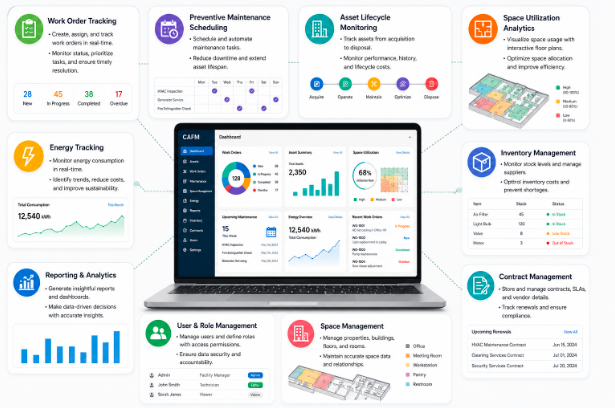
CAFM software provides several essential tools that help facility managers improve efficiency, reduce costs, and manage all operations from a single system. In the points below, we will explain it in detail.
Work Order Tracking
Work order tracking allows users to create, assign, and monitor maintenance tasks in real time. It ensures that every issue is recorded properly and assigned to the right technician without delay. This feature also helps managers track progress and confirm that all tasks are completed on time.
Preventive Maintenance Scheduling
Preventive maintenance scheduling helps organizations plan regular inspections and servicing of equipment before any failure occurs. It reduces unexpected breakdowns and keeps systems running smoothly. This also increases the overall lifespan of machines and reduces repair costs.
Asset Lifecycle Monitoring
Asset lifecycle monitoring tracks each asset from the moment it is purchased until it is disposed of. It provides complete visibility into usage, performance, and maintenance history. This helps organizations make better financial and operational decisions about their equipment.
Space Utilization Analytics
Space utilization analytics shows how different areas of a building are being used in real time. It helps identify underused or overcrowded spaces for better planning. With this data, companies can optimize layouts and improve workplace efficiency.
Energy Tracking
Energy tracking monitors electricity, water, and other resource consumption across facilities. It helps identify areas where energy is being wasted and suggests improvements. This leads to lower operational costs and more sustainable building management.
How to Set Up CAFM Software?
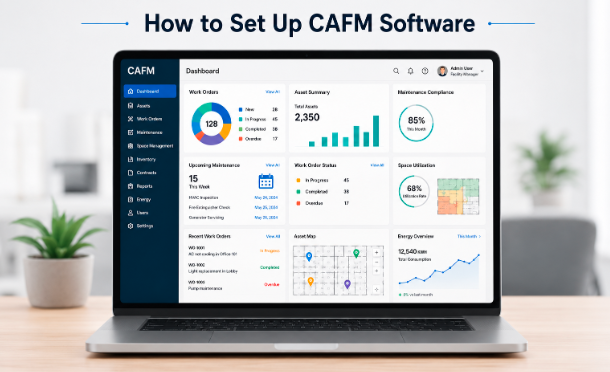
Setting up CAFM software requires a structured approach where organizations define goals, prepare data, and gradually implement the system for smooth adoption. In the points below, we will explain it in detail.
Define Clear Organizational Goals
Defining clear organizational goals helps identify what you want to achieve with CAFM software, such as improving maintenance efficiency or reducing operational costs. It gives direction to the entire setup process. This step ensures the system is aligned with business needs from the beginning.
Audit and Clean Your Data
Data auditing involves reviewing existing facility information to remove errors, duplicates, or outdated records. Clean data is essential for accurate reporting and smooth system performance. This step ensures the CAFM software works with reliable and organized information.
Configure Floor Plans and Assets
In this step, digital floor plans are created, and all assets are properly mapped within the system. It helps visualize buildings, spaces, and equipment in a structured way. This makes it easier to manage and track everything digitally.
Phase Your Rollout
Phased rollout means implementing the CAFM system step by step instead of all at once. It reduces risks and allows users to adapt gradually to the new system. This approach ensures fewer disruptions in daily operations.
Extensively Train Your Team
Training your team is important so that all users understand how to operate the CAFM software effectively. It improves user confidence and reduces mistakes during real use. Proper training ensures the system delivers maximum benefits.
Managing Assets in CAFM System
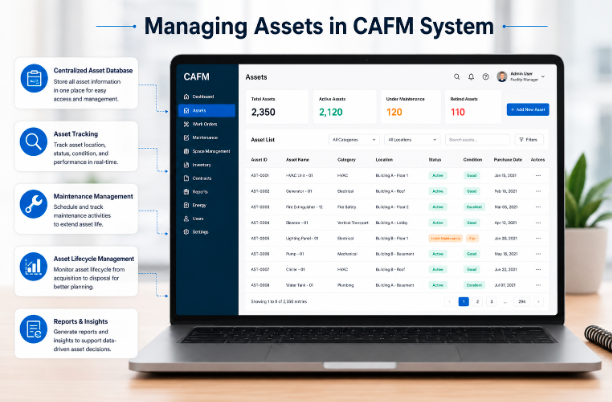
Managing assets in a CAFM system improves control by centralizing data, automating processes, and enhancing visibility across all operations. In the points below, we will explain it in detail.
- Centralizing asset data into one unified system helps organizations maintain accurate, updated, and easily accessible records. It also reduces duplication and improves overall data reliability across all facility operations.
- Automating maintenance schedules ensures that servicing tasks are triggered on time without manual effort or delay. This helps prevent unexpected breakdowns and keeps equipment running smoothly for longer periods.
- Tracking lifecycle stages from acquisition to disposal provides complete visibility into how each asset performs over time. It also supports better budgeting decisions and efficient replacement planning.
- Monitoring performance in real time allows facility managers to quickly identify faults, inefficiencies, or usage issues. This improves response time and ensures smooth and continuous operations.
Work Order Management Process
A structured workflow is used to efficiently manage maintenance and service tasks from creation to completion for smooth facility operations. In the points below, we will explain it in detail.
Create Work Orders
Work orders are created by logging maintenance requests with complete details such as issue type, priority level, and exact location of the problem. This helps ensure that every request is clearly documented and properly understood before any action is taken.
It also allows the maintenance team to prioritize tasks based on urgency and importance. This step serves as the foundation of the entire work order management process.
Assign Tasks
After creation, work orders are assigned to the most suitable technicians based on their skills, experience, and current workload. This ensures that the right person handles the right task, improving efficiency and reducing errors. Proper task assignment also helps balance the workload among team members. It leads to faster response times and better service quality.
Track Progress
Progress tracking allows managers to monitor the status of each work order in real time from start to finish. It helps identify delays, obstacles, or pending actions that may affect completion time. This transparency ensures better coordination between teams and supervisors. It also improves accountability and operational control throughout the process.
Complete and Close Tasks
Once the maintenance work is finished, the task is reviewed, verified, and marked as complete in the system. Proper documentation is added to record what work was done and how the issue was resolved. This ensures quality assurance and creates a reliable history for future reference. Finally, closing the task helps keep the system updated and organized.
Inventory and Spare Parts Management
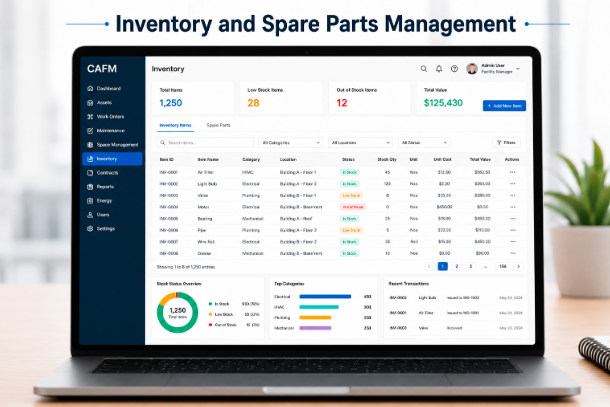
A structured system for tracking, storing, and managing spare parts to reduce downtime and control inventory costs in facilities. In the points below, we will explain it in detail.
Tracking Inventory Levels
Tracking inventory levels ensures that all spare parts are properly recorded and monitored in real time. It helps avoid shortages or overstocking of essential components. This improves overall stock accuracy and availability.
Proper Storage Management
Proper storage management organizes spare parts in a systematic way for easy access and identification. It reduces the time wasted in searching for required items. This also helps maintain the quality and condition of stored parts.
Replenishment Planning
Replenishment planning ensures that new stock is ordered before existing items run out. It helps maintain the continuous availability of critical spare parts. This reduces delays in maintenance and prevents equipment downtime.
Cost Control Efficiency
Effective inventory management helps reduce unnecessary storage and carrying costs. It ensures only the required stock is maintained based on usage patterns. This leads to better financial control and resource optimization.
Using CAFM Software on Mobile Apps
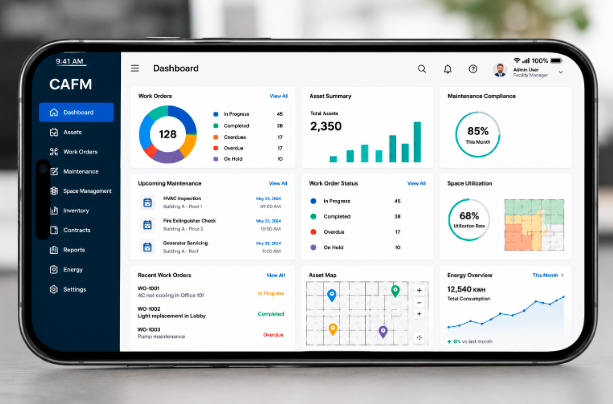
CAFM mobile apps enable technicians and facility managers to manage maintenance tasks, assets, and work orders anytime and anywhere for faster operations. In the points below, we will explain it in detail.
Handle Work Orders
Mobile apps enable technicians to receive, update, and complete work orders directly from their smartphones or tablets in real time. This removes the need for manual paperwork or office-based reporting, reducing delays in communication. As a result, tasks are completed faster and with improved accuracy and efficiency.
Asset Tracking on the Go
With mobile access, users can instantly view, update, and manage asset information while working in the field. This ensures that all records remain accurate, up to date, and easily accessible at any time. It also improves visibility and helps managers monitor equipment status more effectively.
Real-Time Maintenance Updates
Technicians can quickly report task progress, issues, or completion updates directly through the mobile application. Managers receive instant notifications and can monitor work status without waiting for manual reports. This improves communication flow and enhances overall operational control.
Improved Field Efficiency
CAFM mobile apps reduce paperwork by digitizing all maintenance and facility management processes. Teams can work more flexibly and respond quickly to maintenance requests or emergencies. This leads to higher productivity and faster service delivery across all operations.
Benefits of Using CAFM Software
CAFM software improves facility performance by reducing costs, extending asset life, optimizing space usage, and simplifying compliance management. In the points below, we will explain it in detail.
- Reduced operational costs through automated maintenance that minimizes repair expenses and lowers manual workload, leading to better budget control
- Extended asset lifespan by ensuring regular preventive maintenance that keeps equipment in good condition and reduces wear and tear
- Optimized space utilization by analyzing facility usage and identifying underused areas for better planning and efficient space management
- Streamlined compliance tracking by maintaining proper records and ensuring timely adherence to safety and regulatory requirements
Challenges in CAFM Implementation
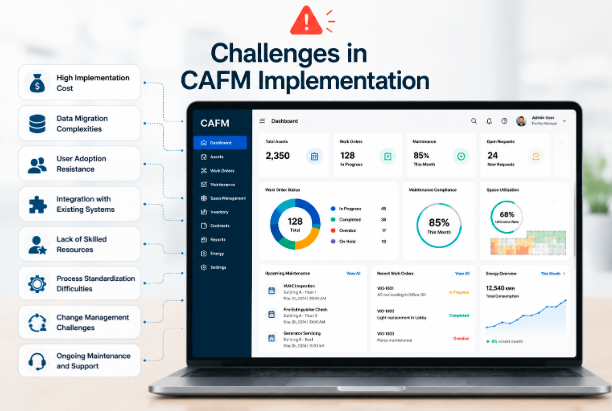
CAFM implementation can be difficult due to data issues, system integration complexity, and resistance from staff during adoption. In the points below, we will explain it in detail.
Poor Data Integrity
Poor data integrity occurs when existing facility information is incomplete, outdated, or inaccurate. This can lead to errors in reporting and system performance issues. It also affects decision-making and reduces the effectiveness of CAFM software.
Complex Integrations
Integrating CAFM software with existing systems like ERP or BMS can be technically challenging. It often requires time, expertise, and proper planning to ensure smooth connectivity. Without proper integration, workflow efficiency can be reduced.
Staff Resistance
Employees may resist adopting CAFM software due to a lack of training or comfort with traditional methods. This slows down implementation and affects productivity during transition. Proper training and support are essential to overcome this challenge.
Future of CAFM Software
The future of CAFM software is moving toward intelligent and fully automated systems that require less human involvement. It is shifting from reactive task automation to autonomous operations powered by AI and IoT technologies.
These systems will help predict maintenance needs before equipment failures occur and automatically schedule necessary actions. Real-time data from connected devices will improve monitoring accuracy and decision-making. This evolution will make facility management more efficient, proactive, and data-driven.
FAQs
How much does CAFM software typically cost for a small or medium-sized organization?
CAFM software pricing varies widely depending on the vendor, features, and number of users required by the organization. Basic plans can start from a few hundred dollars per month, while enterprise-level systems can cost thousands of dollars annually. Many vendors also offer customized pricing based on the size of the facility and specific management needs.
Can CAFM software be integrated with existing accounting or HR systems?
Yes, most modern CAFM platforms support integration with popular accounting, HR, and ERP systems through APIs or built-in connectors. This allows seamless data sharing between departments, reducing duplicate data entry and improving overall organizational efficiency. However, complex integrations may require technical support or custom development depending on the existing systems being used.
Is CAFM software suitable for small businesses, or is it only for large organizations?
CAFM software is available in different scales and can be used by both small businesses and large enterprises, depending on their facility management needs. Smaller organizations can benefit from basic versions that handle work orders, asset tracking, and maintenance scheduling at a lower cost. As the business grows, the system can be scaled up with additional features and users without switching platforms.
How long does it usually take to fully implement CAFM software in an organization?
Full implementation of CAFM software typically takes anywhere from a few weeks to several months, depending on the size of the organization and the complexity of existing data. Smaller facilities with clean and organized data can complete setup much faster than large enterprises with multiple buildings and thousands of assets. Proper planning, phased rollout, and dedicated staff involvement significantly speed up the implementation process.
How secure is the data stored in CAFM software, especially sensitive facility information?
Reputable CAFM software providers use strong security measures, including data encryption, role-based access controls, and regular security audits to protect sensitive facility information. Cloud-based systems typically store data in secure servers with backup systems to prevent data loss. Organizations should always review the vendor’s data security policy and compliance certifications before choosing a CAFM platform.
Conclusion
CAFM software plays an important role in modern facility management by improving efficiency, reducing costs, and streamlining daily operations. It helps organizations manage assets, maintenance, and space in a more organized and digital way.
With advanced features like automation and real-time tracking, it enhances overall productivity. As technology continues to evolve, CAFM systems will become even more intelligent and essential for smart facility management.
Related Articles
How to Actually Create Software: Step-by-Step Beginner to Advanced Guide
Bus Management Software: Features, Benefits, Types, Working Process, and Complete Guide
What Is the Easiest 3D Modeling Software for Beginners in 2026?
AULA F108 Pro Software Complete Guide: Features, Download, Installation & Customization


