

How to use CAFM software?
May 22, 2026
Bus Management Software: Features, Benefits, Types, Working Process, and Complete Guide
May 22, 2026
“How to actually create software” means solving a real problem by turning an idea into a structured set of instructions that a computer can understand and execute. It is not only about coding, but also about understanding the problem, planning a clear solution, and designing how the system will work step by step.
Software development begins with an idea that is built using programming languages and tools, then tested to remove errors and improve performance. After it becomes stable, it is launched for users and continuously updated over time. In the next section, we will explore this entire process in detail, step by step.
Understanding Software Development in Simple Words

Software development is the complete process of designing, creating, testing, and maintaining digital instructions that tell a computer or device what to do.
What Software Development Really Means
It means converting an idea into a working digital solution that solves real-world problems in an efficient way. It includes planning, coding, testing, debugging, and continuously improving the software based on user needs. Every software starts with understanding what users actually need so the final product can deliver real value and solve their problems effectively.
How Software is Designed and Created
First, the structure, flow, and features of the software are carefully planned before writing any code. Then developers use programming languages, frameworks, and tools to build the system step by step in a structured way. This process ensures the software is well-organized, scalable, and works smoothly across different devices and environments.
Why Testing and Maintenance are Important
Testing is done to detect bugs, errors, and performance issues before the software reaches real users. After testing, maintenance ensures that problems are fixed and new updates are added to improve functionality. This continuous process keeps the software secure, stable, and up to date with changing user requirements and technology.
Step-by-Step Process to Actually Create Software (Complete Roadmap)
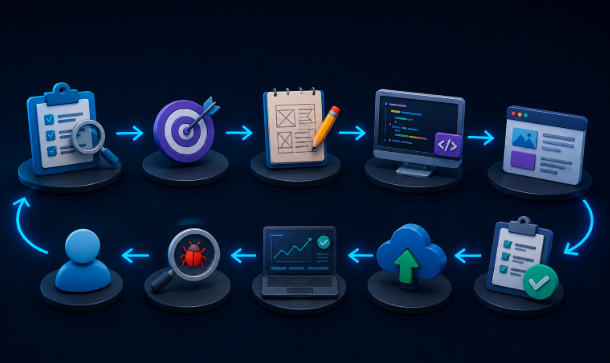
This roadmap explains the complete journey of turning an idea into a working software product, and in the following sections, each step will be explained in detail from idea creation to development, testing, launch, and long-term maintenance.
Step 1 – Idea Generation & Problem Identification
This step focuses on finding a real-world problem that needs a solution through software. The idea is then validated by checking if it is useful, practical, and worth building. Without a clear problem, software development cannot move in the right direction.
Step 2 – Market Research & Competitor Analysis
In this stage, existing solutions and competitors are studied to understand how they work. It helps in identifying gaps, weaknesses, and opportunities in the market. This research ensures your software idea is unique and better than others.
Step 3 – Requirement Gathering
Here, all features and functions of the software are clearly listed based on user needs. It is divided into must-have features and optional features for better planning. This step ensures the development process stays focused and organized.
Step 4 – Project Planning & Roadmap
This step involves creating a proper timeline for development, testing, and launch. Budget and resources are also estimated to avoid future delays and issues. A clear roadmap helps the team stay on track throughout the project.
Step 5 – UI/UX Design (User Experience Design)
In this phase, wireframes, mockups, and prototypes are created to design the user interface. The focus is on making the software simple, attractive, and easy to use. A good design improves user satisfaction and engagement.
Step 6 – Software Architecture Design
This step defines how the entire system will be structured and how different parts will interact. It includes database design and the separation of frontend and backend systems. A strong architecture ensures performance, scalability, and stability.
Step 7 – Software Development (Coding Phase)
In this stage, developers start building the actual software using programming languages. Frontend, backend, and APIs are developed to make the system functional. This is the core phase where the idea becomes a working product.
Step 8 – Testing & Quality Assurance
The software is tested to find bugs, errors, and performance issues before release. Different types of testing, like unit, functional, and security testing, are performed. This ensures the software is reliable and safe for users.
Step 9 – Deployment & Launch
In this step, the software is deployed on servers or released on app stores for users. The production environment is set up to make it accessible worldwide. A successful launch makes the software available for real-world use.
Step 10 – Maintenance & Updates
After launch, the software is continuously monitored for bugs and performance issues. New features and improvements are added based on user feedback. This keeps the software updated, stable, and competitive over time.
Tools Required to Create Software (Beginner to Pro)
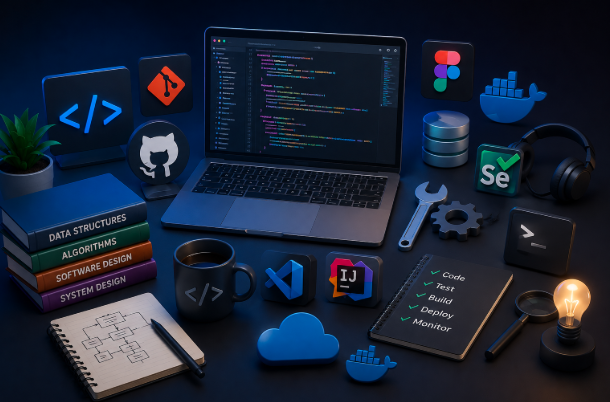
Software development requires different tools that help in coding, designing, testing, and deploying applications efficiently, and in the following section, each tool will be explained in detail.
- Programming languages (Python, JavaScript, Java)
Programming languages are used to write the actual instructions that a computer follows to run software. Python is simple and beginner-friendly, JavaScript is mainly used for web development, and Java is widely used for large applications. - IDEs (VS Code, IntelliJ)
IDEs (Integrated Development Environments) are tools where developers write, edit, and manage their code. VS Code is lightweight and popular for many languages, while IntelliJ is powerful and mostly used for Java development. - Version control (Git, GitHub)
Version control helps track changes in code and allows multiple developers to work on the same project. Git manages the code history, while GitHub is a platform to store and share projects online. - Design tools (Figma)
Design tools are used to create user interface layouts and prototypes before development starts. Figma is a popular tool that allows teams to design and collaborate in real time. - Testing tools (Postman, Selenium)
Testing tools are used to check if the software is working correctly and free of errors. Postman is used for API testing, while Selenium is used for automating browser testing. - Deployment tools (Docker, AWS)
Deployment tools help in launching software so users can access it online. Docker is used to package applications, while AWS provides cloud services to host and run software.
Common Mistakes When Creating Software

Many beginners make mistakes during software development that can affect performance, user experience, and long-term success, and in the following section, each mistake will be explained in detail.
Starting without research
Starting development without proper research leads to unclear goals and a weak software structure. It increases the chances of building something users don’t actually need. Proper research helps in understanding market demand and user expectations. Without it, the project often fails early.
Overcomplicating MVP
An MVP (Minimum Viable Product) should be simple and focused on core features only. Many developers add unnecessary features too early, which delays development and increases complexity. This makes the product harder to test and improve. A simple MVP helps in a faster launch and feedback.
Poor UI/UX planning
Ignoring UI/UX design leads to a confusing and unattractive user experience. If users find the software hard to use, they quickly leave it. Good design should be simple, clean, and user-friendly. Proper planning improves engagement and satisfaction.
Ignoring testing
Skipping testing can result in bugs, errors, and system crashes after launch. Testing ensures the software works correctly under different conditions. Without it, users face problems that damage trust. Proper testing improves reliability and performance.
No scalability planning
Not planning for scalability makes it difficult to handle future growth. As users increase, the system may slow down or crash. Scalable design ensures the software can expand easily. This helps the product grow smoothly over time.
How Much Does It Cost to Build Software?

The cost of building software depends on its complexity, features, and the team you choose, and in the following section, we will break down different cost factors in detail.
Basic apps vs enterprise software
Basic apps are simple and usually cost less because they have limited features and smaller systems. Enterprise software is much more complex, requires advanced features, and is built for large-scale use. Because of this, enterprise solutions are significantly more expensive. The difference mainly comes from scale and functionality.
Freelancers vs development agencies
Freelancers are usually cheaper and suitable for small projects with limited budgets. Development agencies charge more but provide a complete team including designers, developers, and testers. Agencies also offer better quality control and long-term support. The choice depends on budget and project size.
Hidden costs
Hidden costs include maintenance, hosting, updates, and third-party tools or APIs. Many people only consider development costs and forget ongoing expenses. These costs can increase over time as the software grows. Proper planning helps avoid financial surprises later.
Skills Needed to Create Software
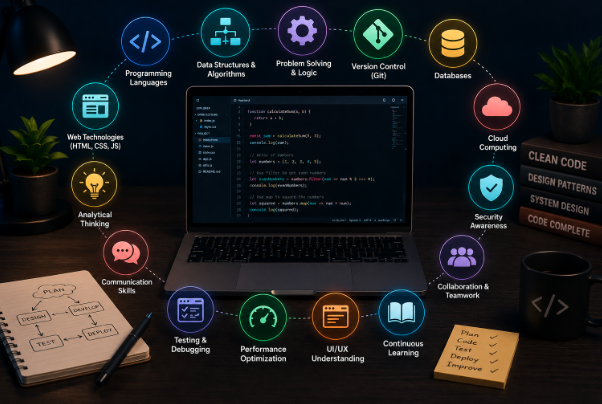
Creating software requires a combination of technical knowledge and logical thinking skills, and in the following section, each important skill will be explained in detail.
Programming basics
Programming basics are essential to write code that tells the computer what to do. They include understanding syntax, variables, loops, and functions. Without these basics, it becomes difficult to build any software. Strong fundamentals make coding easier and more efficient.
Problem-solving skills
Problem-solving skills help developers break down complex problems into simple steps. Software development is mainly about finding solutions, not just writing code. Good problem solvers can design better and faster systems. This skill improves logic and decision-making.
System design thinking
Systems design thinking is the ability to understand how different parts of software work together. It focuses on structure, scalability, and overall architecture. This helps in building efficient and large-scale applications. Good design thinking improves software performance.
Debugging skills
Debugging skills are used to find and fix errors in the code. Every software has bugs, and developers must know how to identify them quickly. Strong debugging improves software quality and stability. It ensures a smooth user experience after launch.
FAQs
How long does it typically take to build software from scratch?
The time required depends on the complexity, features, and team size involved in the project. A simple app may take 1 to 3 months, while a complex enterprise software can take 1 to 2 years or more. Proper planning, clear requirements, and an experienced development team can significantly reduce the overall development timeline.
Can a single person build software alone without a team?
Yes, a solo developer can build software independently, especially for small projects or basic applications. However, larger and more complex software projects require a team of designers, developers, testers, and project managers for efficient development. Solo development is possible but takes more time and requires a broader skill set across multiple areas.
What is the difference between a web app and a mobile app in software development?
A web app runs inside a browser and can be accessed from any device with an internet connection without installation. A mobile app is specifically built for smartphones and must be downloaded and installed from app stores like Google Play or Apple App Store. Both serve different user needs and require different programming languages, tools, and development approaches.
Conclusion
Creating software is a step-by-step process that turns an idea into a fully working digital product. It requires proper planning, design, coding, testing, and continuous improvement. With the right tools and skills, anyone can build useful and scalable software. In the end, success depends on how well each stage is executed and improved over time.
Related Articles
Bus Management Software: Features, Benefits, Types, Working Process, and Complete Guide
What Is the Easiest 3D Modeling Software for Beginners in 2026?
AULA F108 Pro Software Complete Guide: Features, Download, Installation & Customization
How to use CAFM software?


